rig-worker
MCP 14 tools · pure JavaScript · MIT

Agents that model, rig and animate 3D characters.

rig-worker is an MCP server in a single Cloudflare Worker. An agent describes a character as simple shapes, gets back one closed mesh, places bones, binds them with automatic weights, keys a walk, and checks every step with rendered pictures and numbers. It needs no Blender, no GPU and no install, yet everything it makes opens in Blender as it was built.

✓ Blender compatibleMesh, colours, bones, weights and every clip import into Blender 4.5 with default settings, and come back the same. Checked by a round-trip test.
glTF in, glTF out3D viewer inline in Claudebone heat like Blender's Automatic Weightspictures for the agent at every step
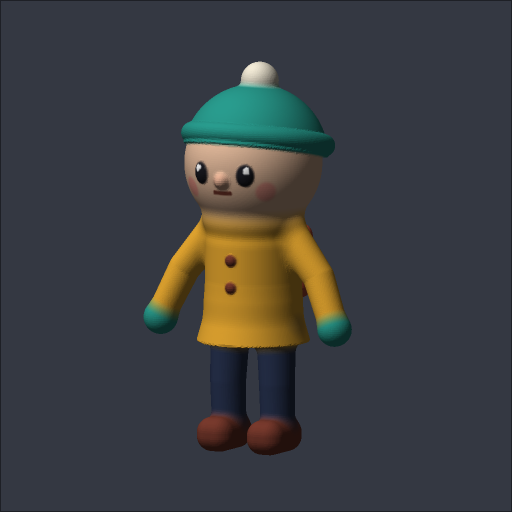
built by the tools pip.glb · 19 shapes · 14 bones · walk 1 s loop · drag to orbit
Connect

Add it to your agent in one line

The public demo needs no token. It is rate limited and keeps your files (separate per client IP) for a day. Point any MCP client that speaks Streamable HTTP at the /mcp URL.

Claude Code

claude mcp add --transport http rig-worker \
  https://rig-worker-demo.epinnock.workers.dev/mcp

Then ask: "Use rig-worker to model a small toy robot, rig it and make it wave. Show me the pictures."

Any MCP client (JSON config)

{
  "mcpServers": {
    "rig-worker": {
      "type": "http",
      "url": "https://rig-worker-demo.epinnock.workers.dev/mcp"
    }
  }
}

Your own deployment adds "headers": {"Authorization": "Bearer <RIG_TOKEN>"}.

Or run the whole example from a terminal

git clone https://github.com/epinnock/rig-worker && cd rig-worker
node examples/pip/run.mjs            # model -> bind -> walk -> qa on the public demo, pictures in out/pip
The pipeline

From shapes to a walking character

Every picture on this page came out of the tools, the same pictures an agent sees after each call. The calls below are the ones in examples/pip; on the public demo the whole run takes about 23 seconds.

Model it from shapes

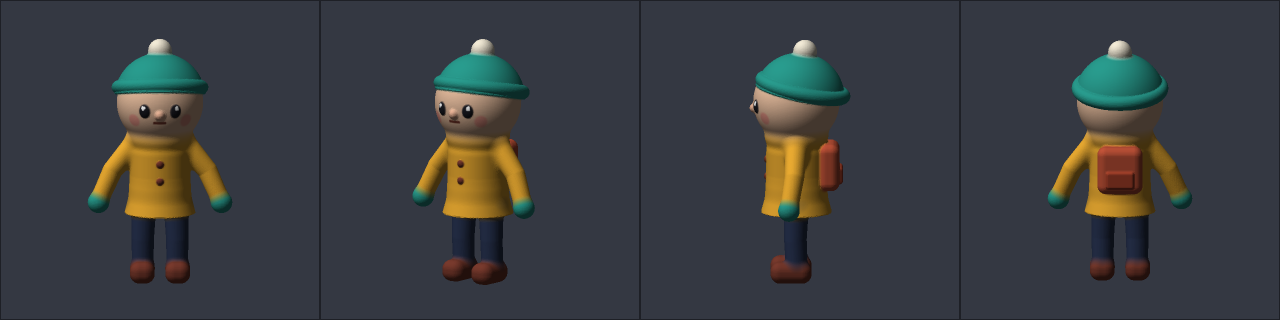
A model is a list of signed-distance shapes (spheres, capsules, tapered tubes, lathes, boxes...) combined in order with smooth unions, cuts and paint. The Worker meshes it into one closed, watertight mesh with vertex colours, ready to rig, and returns a preview in the same call.

{ "name": "model", "arguments": { "out": "pip.glb", "preview": {}, "model": { "shapes": [
  { "name": "head", "type": "sphere", "at": [0, 0.84, 0], "radius": 0.2, "blend": 0.04, "color": "#f1c6a6" },
  { "name": "arm", "type": "tube", "mirror": "x", "points": [[0.12, 0.64, 0, 0.052], [0.22, 0.52, 0.01, 0.046], [0.27, 0.41, 0.03, 0.043]], "blend": 0.03 },
  { "name": "eye", "type": "ellipsoid", "mirror": "x", "radii": [0.026, 0.032, 0.014], ... },
  ...
] } } }
19 shapes · 56,790 vertices · 1 piece · 8.0 s
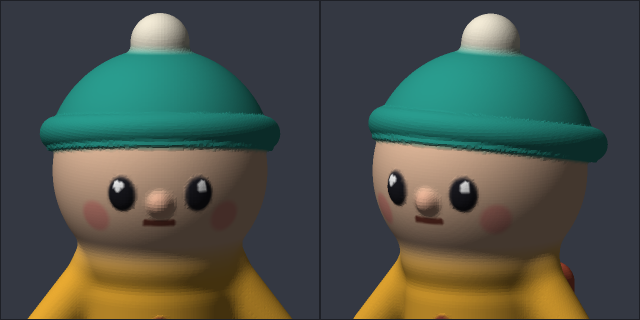
Pip from the front, three-quarter, side and backClose-up of Pip's face

Check the skeleton before binding

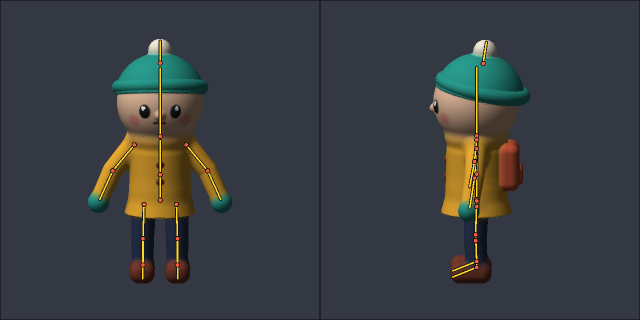
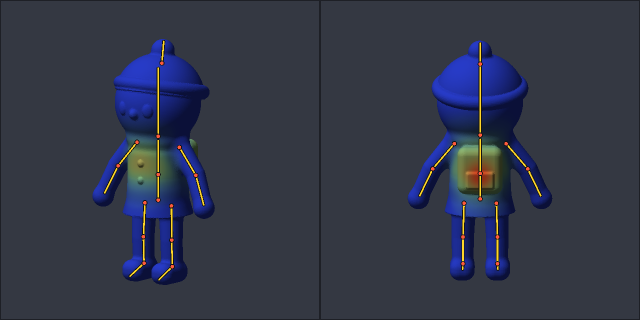
preview overlays a proposed skeleton on the mesh, so the agent can see a knee sitting outside the leg before it spends a bind. Bones are plain JSON: a head, a tail and a parent, in metres.

{ "name": "UpperLeg.L", "parent": "Hips",
  "head": [0.075, 0.36, 0], "tail": [0.08, 0.2, 0.005] }
14 bones, including a bobble on the hat · 0.6 s
Skeleton overlay on Pip, front and side

Bind with automatic weights

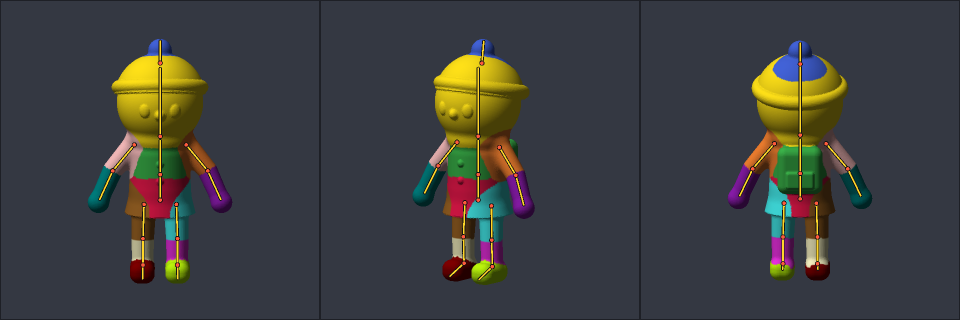
bind solves bone heat (Baran & Popović 2007, the method behind Blender's Automatic Weights) on a closed voxel proxy, so it also works on broken scan or AI-generated meshes. A weights preview shows which bone owns each vertex.

{ "name": "bind", "arguments": { "file": "pip.glb", "out": "pip_rig.glb", "skeleton": { "bones": [...] } } }
// -> { createdSkin: true, vertices: 56790, bones: 14, bonesOwningNoVertex: [] }
9.0 s on the demo Worker
Pip coloured by dominant bone

Animate, then check it

animate writes keyframes as Euler degrees per bone. qa samples the clip and reports frames that sink below the floor, stretched or squashed edges, and hotspots with a ready-made region to repair with paint_weights.

{ "name": "qa", "arguments": { "file": "pip_rig.glb", "animation": "walk", "frames": 24 } }
// -> summary: { framesSinkingBelowGround: 0, maxSink: 0.002, worstEdgeRatio: 4.88 }
//    hotspots: [{ dominantBone: "LowerLeg.L", restBox, surfacePoint, points, ... }]
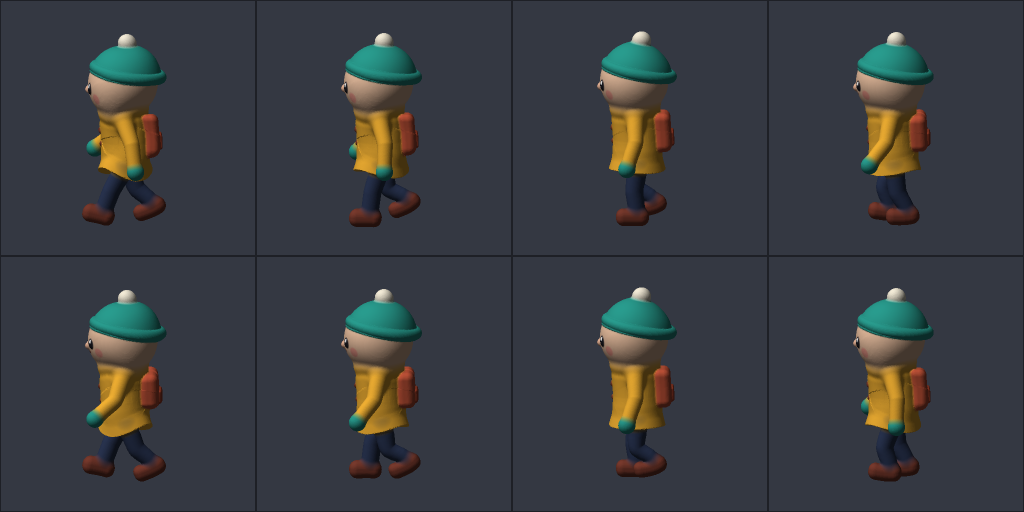
walk: 15 channels, 8 keys, 1 s loop · qa 1.4 s
Eight frames of Pip's walk from the side
Playground

Build a model on the public demo

This calls the model tool on the demo Worker straight from your browser. Edit the JSON (change a colour, move the pompom, add a shape) and build. The demo allows 6 builds a minute.

The preview appears here.
Reference

The 14 tools

Files are GLBs in the Worker's R2 bucket, named with letters, digits, . _ -. Tools that change a file take out to save under a new name (default: overwrite). The full JSON schemas come from tools/list.

ToolWhat it doesKey arguments
modelShapes → one closed mesh with vertex colours; stores the model JSON in the file so later calls send only a patch. Optional preview in the same call.out, model {shapes, res} or from + patch, res, preview
get_modelThe model JSON inside a file made by model.file
inspectBounds, counts, horizontal slices with separate blobs (legs and arms show up as clusters), current skeleton and animations.file, slices
previewPNG views: shaded, weights (colour per dominant bone) or one bone's weight; skeleton overlay or a proposed skeleton; a pose; animation frames; zoom on a joint.file, mode, bone, views, elev, skeleton, pose, frames, time, focus, res
bindBuilds the skeleton and skin (or re-weights an existing skin) with bone-heat weights.file, skeleton {bones}, options {voxel, lapScale}
get_skeletonThe skin's skeleton as bind JSON, to edit and bind again.file
paint_weightsSet, add or scale one bone's weight in a sphere or box; other bones keep their proportions; top 4, normalised.bone, region, op, value, falloff
animateWrites or replaces a keyframed clip: rotations per bone, offsets for the root.name, duration, loop, interpolation, tracks [{bone, keys [{t, rot, move}]}]
qaSamples a clip or pose: frames below the rest-pose floor, edges past a length ratio, hotspots with restBox, surfacePoint and flagged points.animation or pose, frames, stretch, sinkTolerance
exportA signed download link (no header needed), plus a link to the file in the 3D viewer.file, expires_minutes
viewShows a file to the user in the interactive 3D viewer: inline in hosts with MCP Apps (Claude and others), and as a signed link for any browser.file, expires_minutes
list_filesStored files with sizes.
delete_fileDelete a stored file.file
import_urlFetch a GLB from a URL into storage (self-hosted only).url, name

Conventions

See it in 3D

A viewer the agent can hand you

Ask the agent to show you a model and it calls view. In Claude, and in other hosts that support MCP Apps, the viewer opens right in the chat. Everywhere else the tool returns a signed link that opens the same viewer in a browser for an hour (up to a week on a self-hosted Worker). Orbit and zoom, play or scrub every clip or go to the bind pose, colour the mesh by skin weights (by region, or one bone as a heat map), and turn on the wireframe, skeleton and bounds. The panel lists triangles, bones, size and every clip.

It is live. Every open copy of a file, inline or from a link, reloads within a few seconds when the agent saves that file again under the same name. You keep your camera, clip, time and shading. An old link shows the latest version until it expires.

Pip as the demo makes it. Open the viewer on its own page and drop in any .glb; the file stays in your browser.

WhereHow
Claude, MCP Apps hostsview carries _meta.ui.resourceUri = ui://rig-worker/viewer.html; the host renders that resource and passes it the tool result, a signed GLB link on this Worker.
Any browserThe view link, /view/<file>?exp&sig, which export also returns. No token needed until the link expires. The page checks the file's ETag every 2 s (every 15 s after 10 quiet minutes, paused in a hidden tab) and reloads in place when it changes.
Your own pageviewer/?src=<url of a .glb> on this site (the server needs CORS), or copy src/viewer.html: one file, with three.js from jsDelivr.
Modelling

Sculpting with clay primitives

Each shape is combined, in list order, with everything before it. Because the result is one signed distance field, the mesh is always closed and in one piece when the parts overlap, which is exactly what rigging wants.

TypeParameters (local frame)Good for
sphereradiusheads, hands, eyes
ellipsoidradii [x, y, z]bodies, ears, flattened eyes
boxsize [x, y, z], roundboots, backpacks, robots
cylinderradius, height, round (axis Y)brims, wheels, posts
coneradius, radiusTop, height (axis Y)skirts, hats, noses
torusradius, thickness (ring in XZ)collars, hat folds, mouths (as a cut)
capsulefrom, to, radius, radiusTotorsos, simple limbs
tubepoints [[x, y, z, r], ...]arms, legs, tails, hair strands
latheprofile [[r, y], ...] revolved round Ybottles, vases, hats
groupshapes [...], combined as one shapea cap = sphere minus a box, without cutting the head

Fields on every shape

  • name: unique, used by patches
  • op: union (default), subtract, intersect, paint (recolour only)
  • blend: metres of smooth fillet with what came before (0.01 to 0.05 for body joins)
  • mirror: "x": adds the copy at −x; model the left side at +x
  • at, rot: move and turn (degrees, X then Y then Z)
  • color: #rrggbb; a shape without one takes the colour under it

Resolution: res defaults to the model's size / 160 (a 1.7 m figure gets about 1 cm and 25k vertices). Smaller is finer and slower, capped at 8M grid points.

Patch instead of resending

The model JSON lives inside the GLB, so refinements are small:

{ "out": "pip2.glb", "from": "pip.glb", "patch": [
  { "name": "beanie", "color": "#cc3344" },
  { "name": "scarf", "type": "torus", "before": "head",
    "at": [0, 0.66, 0], "radius": 0.12, "thickness": 0.03 },
  { "name": "pocket", "remove": true }
] }

A patch merges fields (null removes one), adds new names at the end, into a group or before a shape. The result tells you per-shape vertex counts and warns about shapes with no visible effect and separate pieces.

Rigging

The loop an agent runs

inspect → preview with a proposed skeleton → bind → preview mode: "weights" → animate → preview frames + qa → paint_weights fixes → export. The same loop works on a GLB you upload: bind voxelizes the mesh into a closed proxy first, so hollow or many-piece meshes still get clean weights.

Skeleton JSON

{ "bones": [
  { "name": "Hips",  "parent": null,   "head": [0, 0.38, 0], "tail": [0, 0.5, 0] },
  { "name": "Spine", "parent": "Hips", "head": [0, 0.5, 0],  "tail": [0, 0.66, 0] },
  { "name": "Nose",  "parent": "Head", "head": [...], "tail": [...],
    "falloff": { "radius": 0.04, "power": 2, "at": "tail" } }
] }

falloff gives tiny bones (a nose, an ear tip) distance weights instead of heat. Bind again with an edited skeleton to move bones; bone names must match the existing skin.

Fixing weights

Spine bone weight, blue 0 to red 1
{ "bone": "Spine", "op": "set", "value": 1, "falloff": "smooth",
  "region": { "sphere": { "centre": [0, 0.52, -0.2], "radius": 0.11 } } }

Prefer a smooth sphere to a hard box: a box with set 1 leaves a seam where it ends (on Pip it raised the worst edge ratio from 5 to 20).

Self-host

Your own private Worker

Self-hosting removes the demo limits and keeps your files private behind a token. You need a Cloudflare account on the Workers Paid plan, because a bind on a large mesh can use up to a minute of CPU (the config allows 5 minutes).

One click

Deploy to Cloudflare

Cloudflare forks the repo, creates the R2 bucket and asks for RIG_TOKEN: any long random string (openssl rand -hex 32). Clients send it as Authorization: Bearer …; it also signs download links.

From a terminal

git clone https://github.com/epinnock/rig-worker && cd rig-worker
npm install
npx wrangler deploy                 # creates the R2 bucket on first deploy
openssl rand -hex 32 | npx wrangler secret put RIG_TOKEN
claude mcp add --transport http rig-worker https://rig-worker.<you>.workers.dev/mcp \
  --header "Authorization: Bearer <RIG_TOKEN>"

Develop and test locally

cp .dev.vars.example .dev.vars      # put a token in it
npm run dev                         # wrangler dev on :8799, local R2
npm test                            # model -> bind -> animate -> qa in Node, no network, ~15 s
RIG_TOKEN=... node examples/pip/run.mjs http://127.0.0.1:8799

Plain HTTP, besides MCP

RouteWhat it does
POST /mcpMCP Streamable HTTP (stateless JSON responses, protocol 2025-06-18)
PUT /files/<name>Upload a GLB (body = bytes, max 64 MB; 8 MB on the demo)
GET /files, GET|DELETE /files/<name>List, download, delete
GET/HEAD /dl/<name>?exp&sigSigned download from export or view, no header. Sends an ETag with no-cache and answers If-None-Match with 304, so a link always serves the latest save
GET /view/<name>?exp&sigThe same file in the 3D viewer, no header
POST /bindMultipart glb + skeleton (+ opts) → rigged GLB, stats in x-rig-stats (self-hosted only)

Public demo limits

The demo is the same code with DEMO=1 (npx wrangler deploy --env demo): no token, so everything is capped.

Requests30 a minute per client IP; model and bind 6 a minute per client and 12 a minute overall
Filesa separate space per client IP (an HMAC of it, not the IP itself), at most 25 files, deleted after a day; uploads up to 8 MB
Meshesup to 150k vertices; model up to 100 shapes and 4M grid points; bind voxel ≥ 0.008
Offimport_url and POST /bind; links expire within 24 h; 60 s of CPU per call
Blender

Opens in Blender as it looks here

Every GLB rig-worker writes imports into Blender (tested with 4.5) with the default glTF settings and no clean-up, and Blender's own export comes back the same. A test in the repo checks this end to end: Blender builds a textured mesh and a rig of its own, rig-worker models, binds, paints and animates, Blender imports each result and compares it with rig-worker's numbers, then re-exports it for rig-worker to read back.

Checked in Blender 4.5Result
Shape at restsame vertices in the same order, within 0.0003 mm
Vertex coloursa colour attribute wired into the material, within 8-bit rounding
UVs and image textures on meshes you bringkept through bind and animate
Bonessame names and parents; each bone points from its head to its tail, so arms and legs point along the limbs, as in a rig made in Blender
Weightsone vertex group per bone, same values
Clipsone action per clip; the deformed mesh matches within 0.05 mm at eight times per clip, for linear, stepped and root-motion clips, and after switching from another clip
Rigs made in Blenderre-weighted in place with their own bone axes, rolls and actions kept
Blender's re-exportreads back into rig-worker with the same shape, weights and motion, and binds and animates again

Run it with BLENDER=/path/to/blender npm run test:blender (about 30 s). Two things in the files exist for Blender's sake: animate keys every bone in every clip (bones a clip leaves alone hold their rest pose, because Blender otherwise keeps them where the last clip put them), and it adds keys every 20° on big turns, because Blender blends quaternion keys linearly where glTF asks for a slerp.

Measured

Speed, cost and accuracy

23 s
The full Pip run on the public demo: model 8.0 s, bind 9.0 s, qa 1.4 s, four previews, paint, animate, export.
97.6%
Vertices whose dominant bone matches Blender 4.5's Automatic Weights on a test creature mesh, with the same skeleton.
$2.59
API cost for an Opus 5.5 agent that modelled a 44-shape toy character, rigged it with 19 bones and walked it, in 14 minutes and 53 turns. Worker CPU: about 1 cent.

How it works

Known gaps